


Form Data Processor: Extract Handwritten Data from Forms to Excel
Batch process scanned hand-filled forms, surveys, and applications. Extract data fields from image or PDF into an Excel spreadsheet using a custom template to eliminate manual data entry.
The Pen to Print Form Data Processor uses advanced AI-powered OCR to extract handwritten data fields into a master digital spreadsheet using a predefined template. Instantly process entire batches of scanned hand-filled forms, surveys, and applications into a single Excel file. Save hours on manual data entry, avoid typing errors, and easily and accurately process large volumes of data from handwriting to text.

Surveys
Applications
Forms to Excel
PDF to Excel
Automate Data Entry with Custom Templates
Pen to Print's batch processing technology turns hours of tedious typing into a fast, automated workflow. Manual data entry isn't just slow, it's prone to costly typing mistakes. The Form Data Processor acts as an automated data entry clerk, ensuring your bulk processing is both fast and accurate.
Customizable Data Mapping
Build a reusable master template that matches your exact database layout. Easily define specific key-value pairs and form fields so our AI accurately extracts only the handwritten names, dates, and responses you need, ignoring the rest.
High-Volume Batch Extraction
Upload entire batches of scanned forms, images, or PDFs at once. The OCR engine processes them simultaneously, transforming stacks of unstructured paperwork into perfectly aligned rows within a single, organized Excel spreadsheet.
TRY FOR FREEHow to Process Hand-filled Forms With Online OCR
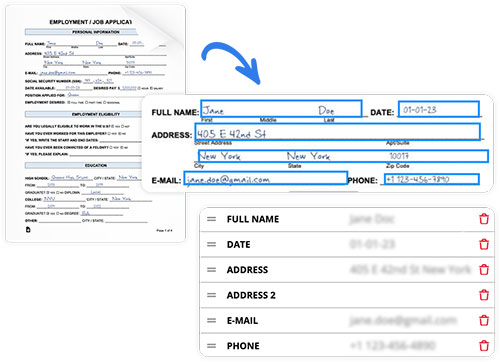
1. Create a Form Template
Start by uploading a single scanned sample of your hand-filled form.
The Form Data Processor will automatically recognize the data fields and highlight them on the scan, presenting each field with its key and value.
You can easily add, modify, rename, or delete these bounding boxes to ensure the template perfectly captures only the specific data you need.
2. Batch Process and Review Your Forms
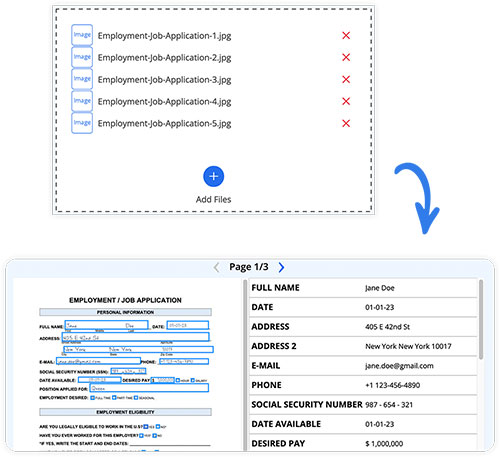
Once your custom template is saved, select it and upload your batch of scanned hand-filled forms (up to 50 images or PDFs per session). Our engine will extract the data instantly.
You can then view the original scans side-by-side with the extracted values, easily browsing through the batch to verify accuracy and make any quick manual corrections if needed.
3. Export Extracted Data to Excel or Word
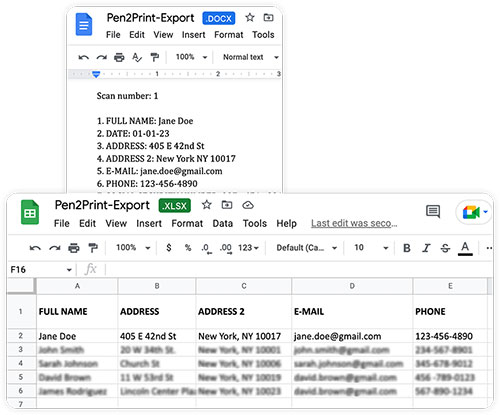
Finally, export your extracted batch to the digital format that best fits your workflow.
Download the entire batch as an Excel or CSV file to create a structured master table, where each key becomes a column header and every form gets its own row.
Alternatively, export to a Word or TXT document to save the keys and values as a continuous, organized list.

Handwriting OCR Form Processing Step-by-Step
The full guide to processing handwritten forms to digital sheets

Convert PDF to Excel With Online OCR Tools
Digitize scanned handwritten forms and tables